
Artificial intelligence has quietly become part of the modern workplace. What started as a novelty for generating funny stories and answering random questions has evolved into something much more practical. Today, professionals use AI to draft reports, analyze data, brainstorm marketing campaigns, summarize meetings, write code, conduct research, and manage daily workloads.
Among the growing number of AI assistants available, two names dominate almost every conversation: ChatGPT and Claude. Both promise to save time, improve productivity, and help people work smarter. Yet anyone who has spent time using both tools quickly discovers that they are not identical. The differences become noticeable once real work enters the picture.
A content writer may prefer one platform for long-form articles. A developer might lean toward the other for coding assistance. Business professionals often find themselves switching between both depending on the task. The question is no longer whether AI can help at work. The real question is which AI assistant provides the greatest value when deadlines are approaching and quality matters.
This comparison goes beyond marketing claims and feature lists. Instead, it focuses on how these tools perform in practical workplace situations, where reliability, accuracy, speed, and usability matter most.
Understanding the Two AI Giants
ChatGPT and Claude were created by different companies with different philosophies.
ChatGPT is developed by OpenAI, the company that brought generative AI into mainstream awareness. It has become one of the most widely used AI platforms in the world, attracting students, marketers, business owners, developers, and enterprises.
Claude is developed by Anthropic, a company founded by former OpenAI researchers. Claude was built with a strong emphasis on helpfulness, safety, and nuanced reasoning. Many users describe Claude as feeling more thoughtful and conversational during complex discussions.
While both tools rely on large language models, their behavior can differ significantly in everyday use. Those differences become more obvious when handling demanding professional tasks.
Quick Comparison
| Feature | ChatGPT | Claude |
| Developer | OpenAI | Anthropic |
| Writing Quality | Excellent | Excellent |
| Coding Support | Strong | Strong |
| Research Assistance | Very Good | Very Good |
| Long Context Handling | Excellent | Excellent |
| Custom GPTs | Available | Limited |
| Integrations | Extensive | Growing |
| Business Adoption | Very High | Increasing |
| Ease of Use | Beginner Friendly | Beginner Friendly |
The table suggests a close contest, but workplace performance depends on much more than specifications.
Writing and Content Creation
For writers, marketers, editors, and communication professionals, AI has become a daily companion. Drafting content faster is one thing. Producing content that sounds natural and useful is another.
ChatGPT has earned a strong reputation among content creators because of its versatility. It adapts well to different tones, formats, and audiences. Whether you’re writing a landing page, product description, email campaign, or blog article, ChatGPT usually understands formatting instructions quickly and follows them with reasonable consistency.
Claude takes a slightly different approach. Many writers describe Claude’s output as more fluid and naturally human. The language often feels less mechanical and less formulaic. When handling nuanced topics, Claude frequently produces responses that resemble the work of an experienced editor rather than an automated system.
That distinction becomes particularly noticeable in long-form writing projects.
Areas Where ChatGPT Excels
- SEO-focused content creation
- Marketing copy
- Social media content
- Structured outlines
- Content repurposing
- Keyword integration
- Workflow automation
Areas Where Claude Excels
- Editorial writing
- Thought leadership articles
- Natural conversation
- Brand voice consistency
- Long-form storytelling
- Complex explanations
- Human-like phrasing
“The best AI writer is often the one that needs the fewest edits afterward.”
For many professional writers, Claude’s natural tone provides a slight advantage. For teams focused on speed, templates, and production volume, ChatGPT often wins.

Research and Information Processing
Research can consume hours of a workday. Reading documents, extracting insights, summarizing reports, and identifying trends require attention to detail.
Both platforms handle research surprisingly well, though their approaches differ.
ChatGPT often provides concise and structured responses. Information tends to be organized clearly, making it easier to scan quickly. Professionals who need fast summaries frequently appreciate this style.
Claude often goes deeper into context. Rather than simply summarizing information, it may explain relationships, implications, and underlying patterns. This can be valuable when analyzing complex business issues or industry developments.
Consider a workplace scenario.
A marketing manager uploads a lengthy customer survey report containing hundreds of responses.
ChatGPT might quickly identify:
- Key trends
- Major complaints
- Positive feedback themes
- Actionable recommendations
Claude might identify those same points while also discussing:
- Emotional patterns
- Behavioral indicators
- Potential customer motivations
- Strategic implications
Neither approach is inherently better. The choice depends on whether you prioritize speed or depth.
Research Comparison
| Task | ChatGPT | Claude |
| Fast Summaries | Excellent | Very Good |
| Deep Analysis | Very Good | Excellent |
| Trend Identification | Excellent | Excellent |
| Business Reports | Excellent | Excellent |
| Long Documents | Excellent | Excellent |
| Insight Generation | Very Good | Excellent |
For executives, analysts, consultants, and researchers, Claude often feels more reflective. For teams processing large volumes of information quickly, ChatGPT frequently delivers greater efficiency.

Coding and Technical Work
Software developers were among the earliest professional groups to embrace AI. Writing code, debugging problems, explaining functions, and generating documentation are tasks perfectly suited to language models.
ChatGPT has established itself as a powerful coding assistant. Many developers use it daily for:
- Code generation
- Debugging
- Refactoring
- Documentation
- Learning new frameworks
- Explaining technical concepts
Its ecosystem adds significant value. Developers can integrate ChatGPT into various workflows and platforms, making it easier to incorporate into existing processes.
Claude has improved rapidly in coding performance. Many programmers praise its ability to understand large codebases and maintain context throughout lengthy technical discussions. When reviewing complex systems, Claude often demonstrates impressive reasoning abilities.
Common Developer Tasks
| Task | ChatGPT Performance | Claude Performance |
| Generate Code | Excellent | Excellent |
| Fix Bugs | Excellent | Very Good |
| Explain Code | Excellent | Excellent |
| Large Project Analysis | Very Good | Excellent |
| Documentation | Excellent | Excellent |
| Technical Discussion | Very Good | Excellent |
One software engineer described the difference this way:
“ChatGPT feels like a fast junior developer. Claude sometimes feels like a careful senior reviewer.”
That comparison is not universally true, but it captures a perception shared by many technical professionals.

Handling Long Documents and Large Context Windows
A workplace rarely consists of short prompts and simple answers. Professionals routinely deal with contracts, reports, research papers, presentations, meeting transcripts, policy documents, and lengthy project files.
This is where context handling becomes critical.
Older AI systems struggled once conversations became lengthy. Important details would disappear or become distorted as the discussion progressed.
Modern versions of both ChatGPT and Claude have made substantial progress. They can process large amounts of information while maintaining coherence throughout extended interactions.
For legal teams, consultants, analysts, and researchers, this capability has become one of the most valuable features of modern AI assistants.
Situations Where Large Context Matters
- Reviewing contracts
- Analyzing annual reports
- Summarizing research studies
- Examining technical documentation
- Processing customer feedback datasets
- Evaluating policy documents
- Reviewing meeting transcripts
When dealing with particularly long files, many users report that Claude performs exceptionally well at retaining context across extended conversations. ChatGPT remains highly capable but may occasionally require more structured prompting to maintain focus on specific details.
For document-heavy professions, this category is one of Claude’s strongest arguments.
Productivity and Workflow Integration
An AI tool is only as useful as its ability to fit into existing workflows.
Many organizations do not simply want answers. They want systems that connect with daily operations, collaboration tools, and business software.
ChatGPT has invested heavily in expanding its ecosystem. Custom GPTs, integrations, automation capabilities, and third-party connections allow organizations to create specialized workflows tailored to their needs.
Examples include:
- Customer support assistants
- Marketing planning tools
- Internal knowledge bases
- Sales enablement systems
- Training resources
- Research assistants
Claude takes a more focused approach centered on conversation quality and reasoning.
For some businesses, simplicity is attractive. For others, integration flexibility becomes a decisive advantage.
The difference often depends on company size.
Small teams may appreciate Claude’s straightforward experience.
Larger organizations frequently benefit from ChatGPT’s broader ecosystem and customization options.
Accuracy, Reliability, and Trustworthiness
No matter how impressive an AI assistant appears, professionals eventually judge it based on one factor: Can I trust the output?
This is where both ChatGPT and Claude still require human oversight. Neither platform is perfect. Both can occasionally produce incorrect information, misunderstand context, or present assumptions as facts. The difference lies in how they tend to approach uncertainty.
ChatGPT is often more willing to provide an answer, even when information is incomplete. This can be helpful when brainstorming or exploring possibilities, but it also increases the likelihood of occasional inaccuracies. Claude generally appears more cautious. When uncertainty exists, it is more likely to acknowledge limitations or explain where confidence may be lower.
For workplace use, this distinction matters. An inaccurate social media caption might be harmless. An inaccurate financial analysis or legal summary could create serious problems.
Best Practices for AI Accuracy
Regardless of which platform you use, professionals should follow a simple verification process:
| Task Type | Verification Needed |
| Blog Writing | Moderate |
| Marketing Content | Moderate |
| Research Reports | High |
| Legal Documents | Very High |
| Financial Analysis | Very High |
| Medical Content | Very High |
| Internal Communications | Moderate |
Never rely entirely on AI-generated facts without verification.
The most productive professionals treat AI as a highly capable assistant rather than a final authority.
Common Accuracy Challenges
- Misinterpreted instructions
- Outdated information
- Incorrect citations
- Fabricated references
- Overconfident responses
- Missing context
- Oversimplified conclusions
The winner here is difficult to declare because accuracy often depends more on prompting quality than the platform itself. Still, many users report that Claude’s cautious approach can reduce certain types of errors during complex reasoning tasks.
Pricing and Value for Money
Cost matters, especially for freelancers, startups, and businesses deploying AI across teams.
At first glance, both platforms offer competitive pricing structures. The real value comes from how much productive work you can complete with each tool.
A freelancer writing content all day may calculate value differently than a software company using AI across hundreds of employees.
Pricing Considerations Beyond Subscription Fees
When evaluating cost, consider:
- Time saved
- Quality of output
- Number of revisions required
- Learning curve
- Integration capabilities
- Team collaboration features
- Productivity improvements
A slightly more expensive platform can easily become the better investment if it reduces hours of manual work each week.
Cost vs Productivity Framework
| Factor | ChatGPT | Claude |
| Content Volume | Excellent | Very Good |
| Editing Required | Low | Low |
| Team Scalability | Excellent | Very Good |
| Workflow Automation | Excellent | Good |
| Long-Form Writing Value | Very Good | Excellent |
| Enterprise Adoption | Excellent | Growing |
For organizations seeking extensive integrations and workflow customization, ChatGPT often provides stronger long-term value.
For professionals focused primarily on writing, analysis, and reasoning, Claude’s value proposition remains highly competitive.
Security and Privacy Considerations
Businesses increasingly handle sensitive information through AI tools. Contracts, client communications, internal reports, strategic plans, and proprietary data often pass through these systems.
As a result, privacy has become a major consideration during AI adoption.
Both OpenAI and Anthropic have invested heavily in enterprise security features. Yet organizations should still review policies carefully before sharing confidential information.
The smartest companies establish internal AI usage guidelines before deployment.
Questions Businesses Should Ask
Before selecting an AI platform, consider:
- How is data stored?
- Is data used for model training?
- What enterprise controls exist?
- Are compliance requirements supported?
- How are user permissions managed?
- Can administrators monitor usage?
Security Evaluation Checklist
| Security Factor | Importance |
| Data Protection | Critical |
| User Access Controls | Critical |
| Compliance Support | High |
| Audit Capabilities | High |
| Enterprise Administration | High |
| Privacy Policies | Critical |
For large organizations, procurement teams frequently evaluate these factors just as carefully as productivity features.
Real Workplace Scenarios: Which Tool Performs Better?
Specifications rarely tell the whole story. Real-world situations reveal where each assistant shines.
Scenario 1: Content Marketing Team
A marketing department needs:
- Blog articles
- Email campaigns
- Social media content
- SEO optimization
- Content calendars
Winner: ChatGPT
Its versatility, workflow flexibility, and structured content generation make it particularly attractive for marketing operations that prioritize scale and efficiency.
Scenario 2: Executive Research and Strategy
A senior executive needs assistance with:
- Industry reports
- Competitive analysis
- Strategic planning
- Market insights
- Long-form summaries
Winner: Claude
Its thoughtful analysis and ability to maintain context across lengthy discussions often make it especially useful for strategic work.
Scenario 3: Software Development Team
A development team requires:
- Code generation
- Documentation
- Debugging
- Architecture discussions
- Technical explanations
Result: Tie
Both tools perform exceptionally well. Personal preference often becomes the deciding factor.
Scenario 4: Freelance Writer
A freelance writer creates:
- Editorial articles
- Thought leadership pieces
- Long-form content
- Client publications
Slight Winner: Claude
Many writers appreciate Claude’s naturally flowing language and reduced need for stylistic editing.
Scenario 5: Business Operations Team
An operations department manages:
- Process documentation
- Internal communications
- Reporting
- Workflow automation
- Team productivity
Winner: ChatGPT
Its broader ecosystem creates more opportunities for automation and process improvement.
Where ChatGPT Clearly Leads
Every AI platform develops strengths over time. ChatGPT’s advantages become especially apparent when organizations need flexibility and scale.
Key Advantages of ChatGPT
- Extensive ecosystem
- Custom GPT creation
- Strong integrations
- Excellent coding support
- Broad business adoption
- Workflow automation capabilities
- Consistent structured output
- Large community support
These strengths make ChatGPT particularly attractive for businesses seeking an AI platform that can grow alongside organizational needs.
“The best tool is often the one that fits naturally into existing workflows.”
For many companies, ChatGPT achieves exactly that.
Where Claude Clearly Leads
Claude’s strengths are less about ecosystem size and more about interaction quality.
Many professionals choose Claude because they enjoy working with it.
Key Advantages of Claude
- Human-like writing quality
- Strong contextual understanding
- Thoughtful reasoning
- Excellent long-document analysis
- Natural conversation flow
- Consistent editorial tone
- Deep analytical responses
These qualities make Claude especially attractive for knowledge workers whose success depends on communication, analysis, and critical thinking.
The Verdict: Which AI Tool Actually Wins for Work?
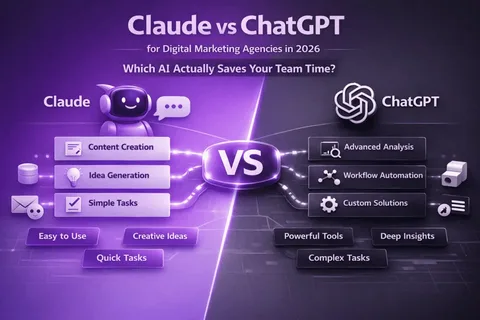
The honest answer is that there is no universal winner.
If your work revolves around marketing, automation, business workflows, coding assistance, and productivity systems, ChatGPT is likely the stronger choice. Its ecosystem continues to expand, and its adaptability makes it valuable across a wide range of professional environments.
If your work focuses on writing, research, strategy, analysis, and nuanced communication, Claude often delivers a more refined experience. The quality of its long-form responses can feel remarkably close to working with a thoughtful human collaborator.
For many professionals, the surprising outcome is that they eventually use both.
ChatGPT becomes the productivity engine.
Claude becomes the thinking partner.
Final Comparison Scorecard
| Category | Winner |
| Marketing | ChatGPT |
| Workflow Automation | ChatGPT |
| Integrations | ChatGPT |
| Coding | Tie |
| Research | Claude |
| Long Documents | Claude |
| Editorial Writing | Claude |
| Strategic Thinking | Claude |
| Business Flexibility | ChatGPT |
| Overall Workplace Utility | Tie |
The best AI assistant depends less on the technology itself and more on the type of work you do every day.
Frequently Asked Questions
1. Is ChatGPT better than Claude for professional writing?
For structured business content and SEO-focused writing, ChatGPT performs exceptionally well. For editorial content and natural-sounding long-form articles, many writers prefer Claude.
2. Which AI tool is better for coding?
Both platforms are highly capable coding assistants. ChatGPT currently benefits from a larger ecosystem, while Claude often excels when analyzing large amounts of code and maintaining context.
3. Can businesses use both ChatGPT and Claude together?
Yes. Many organizations use multiple AI tools depending on the task. Teams often use ChatGPT for productivity workflows and Claude for research or writing projects.
4. Which AI provides more accurate answers?
Neither platform is perfectly accurate. Both require fact-checking for important business decisions. Claude tends to be slightly more cautious when dealing with uncertain information.
5. Is Claude replacing ChatGPT?
No. The market continues to support both platforms because they serve slightly different professional needs. Competition between them is helping both tools improve rapidly.
Conclusion:
ChatGPT and Claude represent two of the most capable AI assistants available today, yet they excel in different ways. ChatGPT stands out for versatility, integrations, automation, and broad business functionality, while Claude shines through thoughtful reasoning, natural writing, and deep contextual understanding. Rather than searching for a universal winner, professionals should focus on which platform aligns best with their daily responsibilities, workflows, and long-term goals.
Call to Action
If you’re considering adding AI to your workflow, spend a week using both ChatGPT and Claude on real tasks instead of relying on feature comparisons alone. Draft reports, analyze documents, brainstorm ideas, write content, and test how each assistant responds to your specific needs. The results will reveal far more than any marketing page, and you’ll quickly discover which tool deserves a permanent place in your professional toolkit.